![OFS_Circle.png]](https://support.ofsystems.com/hs-fs/hubfs/OFS_Circle.png?height=45&name=OFS_Circle.png)
A long line can have several products on it at once: one entering at the in counter, another still mid-line, a third leaving at the out counter. Counts alone cannot tell OFS where one job's output ends and the next begins, so the operator at the packing end confirms it.
This matters most on processes with a long lag between making and packing — proving and baking, firing, or anything that has to freeze before it is packed.
Finalising Counts on the Console
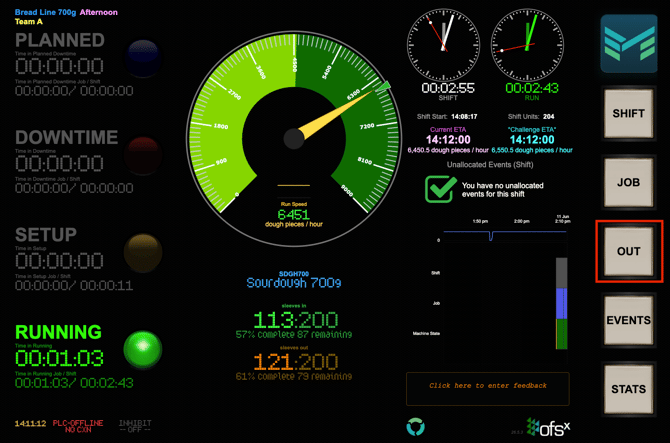
Step 1 — Press the OUT button
Step 2 — Check that packing has finished, then press Finalize
Press Finalise on that job's row once the last unit has come off the line.
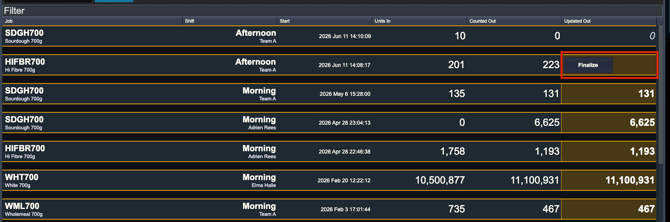
The button disappears, the job's out count is fixed, and units leaving the line start counting against the next job in the queue.
Getting the timing right
This is the part worth taking care with. Finalise too late and the next job's units are credited to the job that just finished. Finalise too early and the last of the finished job's units are credited to the next one. Either way both jobs end up with wrong counts, and both jobs' quality figures and OEE are wrong with them.
Two things that look like faults and are not:
- The job currently running shows a counted-out figure of zero. That is correct — none of its units have reached the out counter yet.
- A mid-line job's units-in figure has stopped moving. Also correct — a job's in count is fixed at the moment the following job starts.
If a job was finalised at the wrong moment, the counts can be corrected afterwards. See How to update my OUT counts on the Console.
If there is no Finalise button
Most lines never show one. Where a line runs one product at a time and is cleared before the next job starts, OFS finalises the out count by itself when the new job begins.
Finalisation is switched on per line by the OFS Support team. It is not a setting you can turn on yourself in Fusion Manager. If your line has started running more than one product at a time and no Finalise button has appeared, raise a ticket through the OFS Service Desk — until it is enabled, every OUT unit is credited to whichever job is currently logged, and nothing on screen will tell you it is happening.