![OFS_Circle.png]](https://support.ofsystems.com/hs-fs/hubfs/OFS_Circle.png?height=45&name=OFS_Circle.png)
Updating the OUT count feeds straight into the line's performance figures. The adjusted number affects OEE and Q%, so put in the figure that reflects good units actually produced.
Step 1 — Press the OUT button
-1.png?width=670&height=419&name=Screenshot%20(3)-1.png)
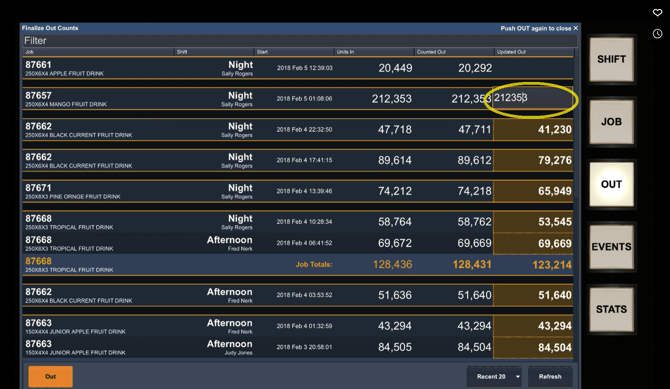
Step 2 — Select the job and enter the new quantity
Select the job you need to correct, press the Updated Out cell, and type the new figure.
Step 3 — Press Enter
Press Enter on the keyboard, or the OUT button in the bottom left corner.
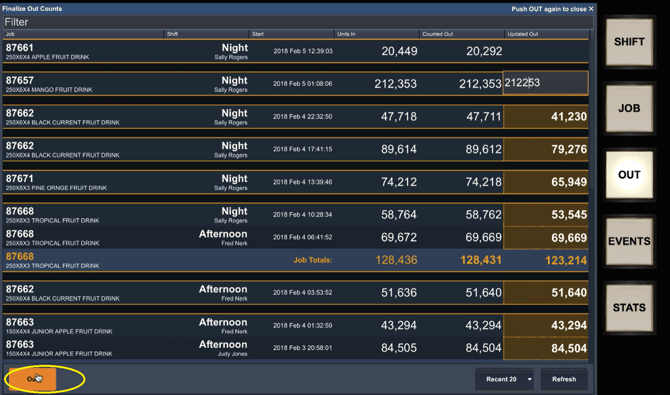
Test it
The saved figure renders in yellow and bold. That is how the Console marks a count as manually adjusted rather than counted, so a corrected job is identifiable at a glance later.
A worked example
A job finishes on 212,353 units out. QA rejects 100 of them. Enter 212,253 as the updated out figure, and the line's quality percentage reflects what was actually good.
Watch this video on how to reconcile OUT counts in OFS.