![OFS_Circle.png]](https://support.ofsystems.com/hs-fs/hubfs/OFS_Circle.png?height=45&name=OFS_Circle.png)
If you've set up a Flow form in Fusion Manager and it's not triggering on the line, work through this checklist.
Step 1 — Check the Disable Alert toggle
- In the alert, go to the General tab and find the Disable Alert toggle.
- Make sure it's switched off.

Step 2 — Turn on Interrupt in the workflow
- Find the workflow associated with the alert.
- Make sure at least one Open state has Interrupt toggled on. This ensures alerts tied to that state interrupt the console screen.


Step 3 — Check the alert trigger
- Go to the Triggers tab.
- Make sure a trigger is set up (e.g. On Start).
- Make sure a line is attached to the trigger.


Step 4 — Check your Alert Group subscription
- On the console, click the Flow icon and make sure the relevant alert groups are ticked.
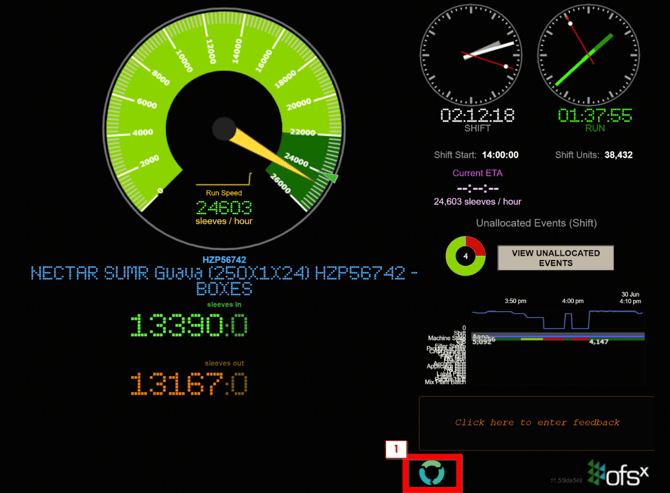
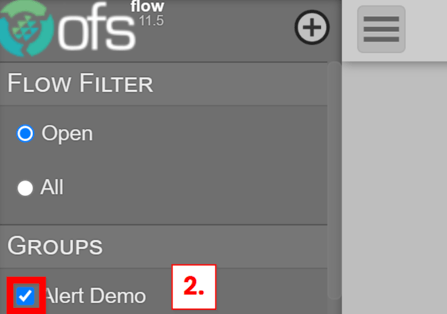
Once you've worked through these steps, your Flow form should be active. If you're still having trouble, raise a request with the OFS Service Desk.