![OFS_Circle.png]](https://support.ofsystems.com/hs-fs/hubfs/OFS_Circle.png?height=45&name=OFS_Circle.png)
OFS-Flow is designed to meet ISO 9001 and ISO 27001 standards for data integrity and traceability, with auditing capabilities that track the lifecycle of a form — including any changes made after a record has been finalised (dismissed).
Tracking post-dismissal amendments
In highly regulated environments, transparency around data modification is critical. OFS-Flow tracks this through specific metadata and reporting columns:
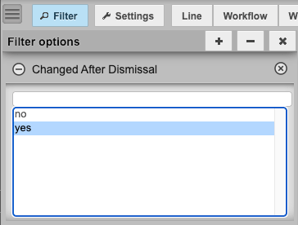
- Changed After Dismissal column — in OFS Analytics (Flow Manager), you can add this column to a report to identify forms that were edited after they were first completed.
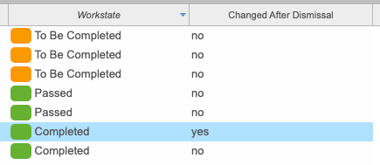
This gives auditors a high-level view to quickly filter for and investigate amended records.
The audit log
Every Flow form raised has a detailed audit log. This is essential for ISO audits, since it captures the who, what, and when of every change:
- User identity — the specific OFS user who made the change.
- Action performed — whether the form was created, transitioned to a new workstate, or had data fields modified.
- Value history — the "from" value and the "to" value, so auditors can see exactly what the data was before and after an amendment.
- Timestamp — every entry is tagged with a precise Unix millisecond timestamp, giving an irrefutable timeline of events.
Version tracking
OFS-Flow provides the technical infrastructure to record data, but version control is a customer-led process. To maintain ISO compliance, we recommend the following:
- Manual version assignment — when a form template is updated (e.g. a change to a temperature threshold or a new compliance question), update the version number in the Alert Message or an info text field.
- Change log maintenance — keep an external Form Register documenting the reason for each change, who authorised it, and the date the new version was deployed to the Operator Console.
- Archive management — when a new version of a form is uploaded to the Alert Configuration, archive the previous JSON schema so there's a historical record of what the form looked like at any point in time.
Auditing version history in OFS
Even though version policy is customer-managed, OFS provides the evidence auditors need to confirm the policy is being followed:
- Configuration snapshots — auditors can verify which configuration was active at the time of a given entry.
- Consistency checks — comparing your Form Register against the
createTimeandconfigUIDin the OFS audit log confirms that only approved, current versions of forms were in use on the factory floor.