![OFS_Circle.png]](https://support.ofsystems.com/hs-fs/hubfs/OFS_Circle.png?height=45&name=OFS_Circle.png)
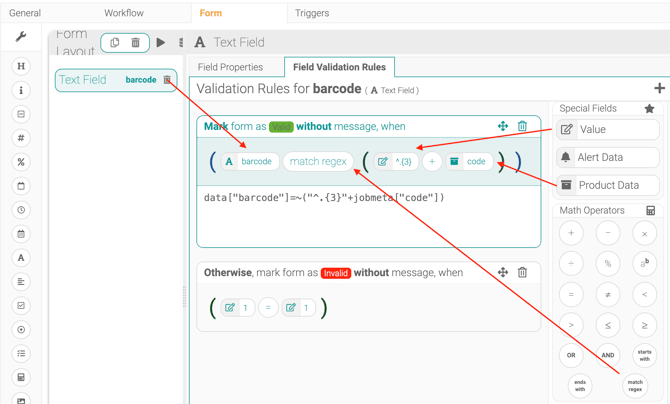
Step 1 — Build the valid condition
- Drag in the field you are validating
- Drag in the 'match regex' sign from the Math Operators
- Drag in the 'Value' field and enter
^.{3} - Drag in the
+sign from the Math Operators, - Drag in Product Data from the Special Fields section and select the matching value, e.g. code:
data["barcode"]=~("^.{3}"+jobmeta["code"])
Step 2 — Add the catch-all invalid rule
Invalidate everything outside the valid match: