![OFS_Circle.png]](https://support.ofsystems.com/hs-fs/hubfs/OFS_Circle.png?height=45&name=OFS_Circle.png)
Background: What is traceability
The objective of the traceability process is usually to identify the prime materials used in manufacturing a product. Typically, a faulty box of product is returned to the plant, and the trace process starts from there. We want to know what materials (paper reels, lids, preforms, that sort of thing) were used to make the product. This is because if we find a defect in a product, identifying the materials used might help us to also identify other products that were also made using some of those materials. We want to know: is it just this one box of product? Did we have other boxes that went to other customers that we now might need to manage?
The traceability process today is heavily reliant on paperwork, which is filled in by operators as a timesheet indicating at what time material is loaded onto a machine. By tracing back from the date the box of product was converted on the last machine in the process, the various timesheets are all manually collated, and the sequence of pallets, bins, buckets, reels and so on is traced back through the plant.
This is a very, very time-consuming process, and often, unfortunately, we find that it is full of errors.
Solving this in OFS-Flow
Let's create two forms in OFS-Flow — the content of the form can be whatever "stuff" people want to put there.
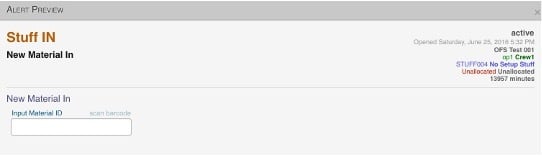
Stuff In (for stuff in, could be expanded for more stuff, e.g. 2 reels, a bucket and a length of rope)
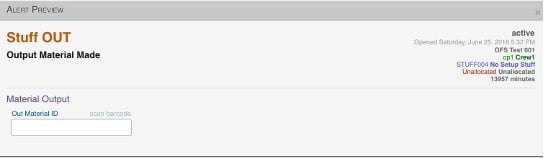
Stuff Out (for stuff out, could be expanded for more stuff)
The triggers for stuff in and/or stuff out could be a signal, e.g. a splice signal, a pallet loaded/eject signal, every X units/time, or manual, i.e. up to the operator to perform when needed.
Importantly, for the purpose of this exercise, the trigger mechanism is not so important. OFS-Flow has a ton of trigger options.
In this example, let's set Stuff In to repeat every 200 units and Stuff Out every 500 units, on Test Line 12.
Workflow
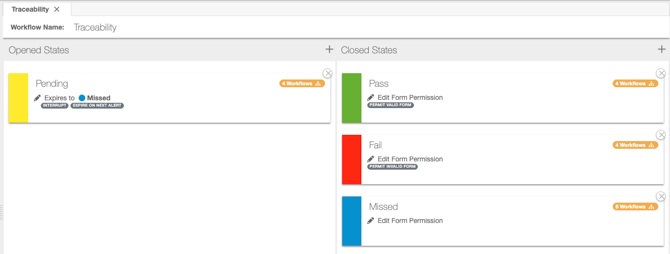
This is a simple pending/pass/fail/missed flow. If material is not recorded by the time the next form pops up, then the Workflow closes the form automatically, with a state of Missed.
Case data methodology
In order to simulate "real-world" traceability, let's apply the following nomenclature.
Line 12:
- Stuff In — Axxxxx
- Stuff Out — AAxxxx
Line 14:
- Stuff In — AAxxxx (matches output from Line 12)
- Stuff Out — Bxxxx (let's call "Bxxxx" the finished product in this example)
Reporting
After a few transactions on the OFS-X console, we have some data, having filled in our Stuff In and Stuff Out forms a few times for this test case.
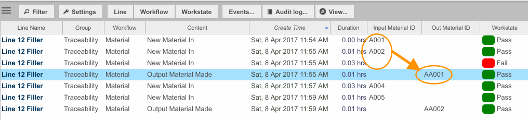
As a result, on a single process (in this example, Line 12 filler), here is what the Flow Manager reports:
Now, what is this telling us?
Importantly, we have ordered the search by create time, so this is a sequential log of what happened; i.e. the sequence of Input Material ID corresponds to the sequence of Output Material ID.
We can see that our material AA001 contained input A001, A002 and an unknown third input (the empty record, clearly indicated with the red Fail workstate, as the operator didn't input the data in time before the alert expired — in this example, that means the next material arrived).
Similarly, we can see that AA002 must contain input material from A004 and A005.
So, on a single work centre, if we want to trace an output material, we can do so in this fashion.
But it gets more interesting when we introduce a second work centre, so let's do that.
Now Line 14 is going to process the output material from Line 12. And then we are going to try to trace the material all the way back from Line 14 to an input material on Line 12.
To make things a bit more interesting, the trigger for Line 14 is set to trigger material in every 300 units and material out every 100 units (i.e. it has a different interval and stacking metric).
This doesn't matter one bit for traceability purposes, and OFS-Flow handles it just fine.
So, with the addition of Line 14, and a few more Stuff In/Stuff Out forms, let's see what our traceability looks like now in OFS-Flow:
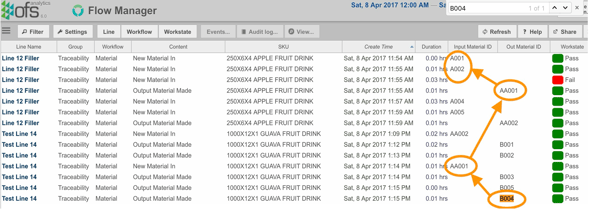
What does this tell us?
Let's say that we have a return of a box, label or item coded "B004", which is where we might start looking. That would also give us ideas of other things like potential dates, SKUs and so on, so as long as we know B004, we can start to do something. This gives us a view like the one above.
We can see that B004 was made from AA001. Then, looking at AA001, we can see that this, in turn, was made from A001, A002 and something else that the operator "failed" to record (missed).
So in this example, what we have found is: the apple fruit drink poured into vat AA001, from apples in buckets A001 and A002, was faulty. Then, we used the "bad" vat AA001 to make our finished keg of guava fruit drink. We made a number of kegs of guava fruit drink, and keg B004 was returned to us as being of "bad taste".
So, given we traced the problem back to AA001, we might be contacting people about material (kegs) B003 and B005, whereas kegs B001 and B002 would appear (at this stage) to be unaffected.