![OFS_Circle.png]](https://support.ofsystems.com/hs-fs/hubfs/OFS_Circle.png?height=45&name=OFS_Circle.png)
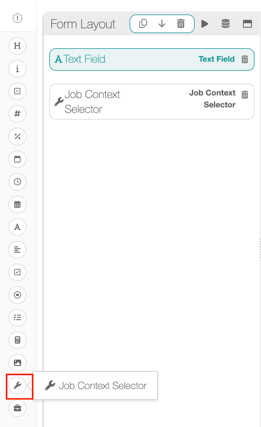
Step 1 — Add a Job Context Selector field to your form
Open your form in OFS-Flow and go to the Form Layout tab.
Scroll to the bottom of the field type list and drag a Job Context Selector onto your form layout.
Step 2 — Configure the field properties
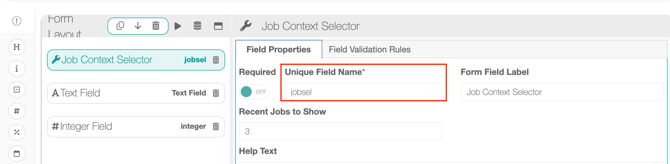
Select the Job Context Selector field to open its Field Properties panel.
Set the following:
- Unique Field Name — This is the name you'll reference in validation expressions
e.g. jobsel - Required — leave Off unless you want the operator to be forced to select a job before submitting.
- Recent Jobs to Show — enter the number of recent job runs to display when the operator uses the selector. The default is 3.
- Form Field Label — optional display label shown to the operator e.g. Job Context Selector
Step 3 — Reference the selected job in a validation rule
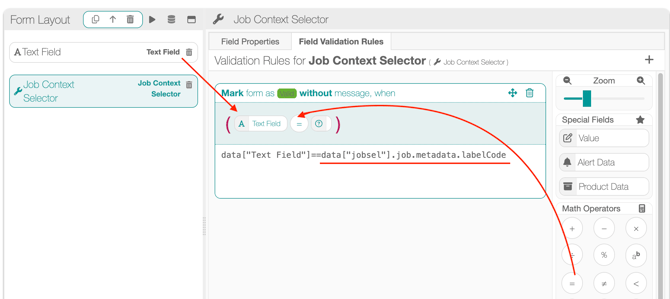
Go to the Field Validation Rules tab for the field you want to validate (e.g. a Text Field or Integer Field where the operator scans a label code).
-
Drag in the field you want to validate e.g. data["Text Field"]
-
Drag in the '=' from the math operators
- Build your condition using the job's metadata. The Job Context Selector makes this available at the following path:
-
data["jobsel"].job.metadata.<property>
-
Replace <property> with the metadata field you want to compare against — for example, labelCode.
-
A complete example:
data["text field"]==data["jobsel"].job.metadata.ratedSpeed
Step 4 — Set the rule outcome
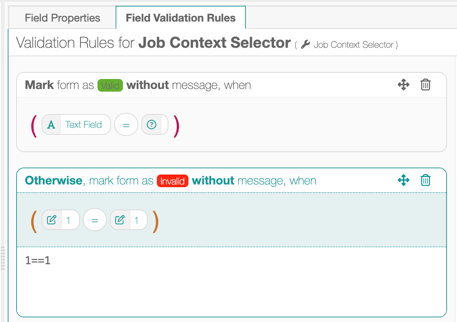
Configure the rule to Mark form as Valid (or Invalid, depending on your logic) and add a message if needed — for example: "Label code does not match the previous job. Please check and try again."
Don't forget the catch-all rule:
1==1
Save your form when done.
Adapting it to your own form
The job.metadata object can hold a range of properties depending on your line and job configuration. Common examples:
- productCode — the product SKU or code
- batchNumber — the batch or lot number
You can use the Job Context Selector in any validation expression where you need to compare a current form entry against a previous job's recorded data — not just barcodes or text fields.
All metadata properties can be viewed in the Products tab of Fusion Manager.