![OFS_Circle.png]](https://support.ofsystems.com/hs-fs/hubfs/OFS_Circle.png?height=45&name=OFS_Circle.png)
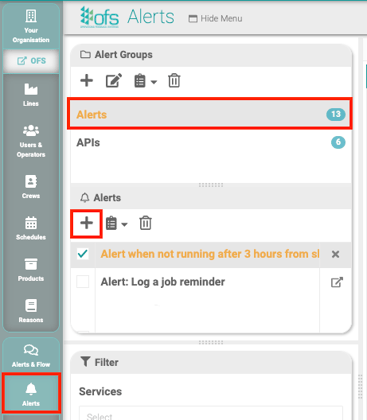
Step 1 — Navigate to Alerts & Flow, then Alerts
Step 2 — Create a new alert group
Give it a name, e.g. Alerts.
Step 3 — Click the + under Alerts to create a new alert
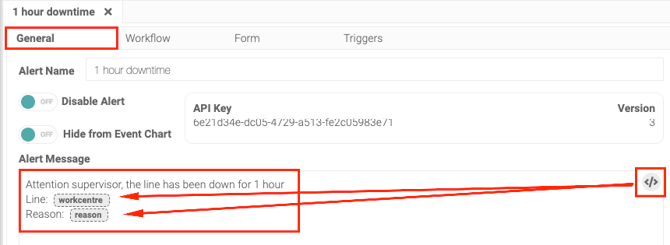
Step 4 — Write the Alert Message on the General tab
See how to format your Alert Message for formatting options.
Use the variables icon to pull in live data from the console rather than typing a generic message.
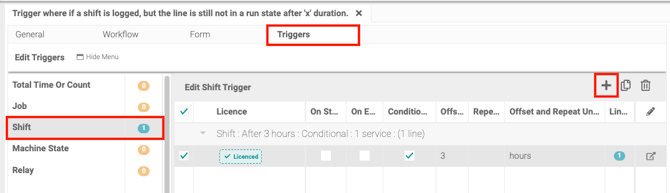
Step 5 — Open the Triggers tab and add a Shift trigger
Click Shift, then the + icon.
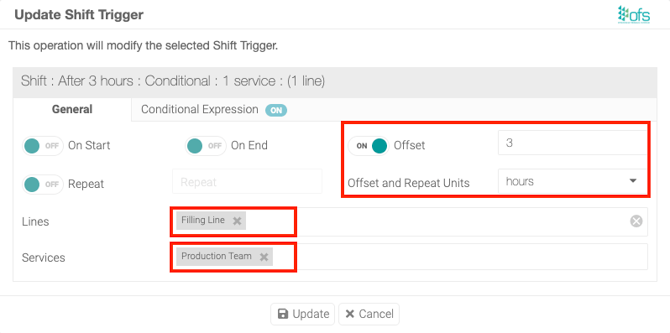
Step 6 — Toggle on Offset
Step 7 — Set the duration
Enter how long after shift start to check, e.g. 3.
Step 8 — Select the units
For example, hours.
Step 9 — Select the lines this alert watches
Step 10 — Select a service
For a video guide on setting up services, see the Alerts & Services overview.
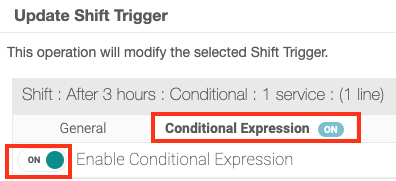
Step 11 — Open the Conditional Expression tab and toggle it on
Step 12 — Enter the condition
shift.metrics.runTime==0This fires the alert only when the line hasn't run at all since the shift started — rather than just checking whether time has passed.
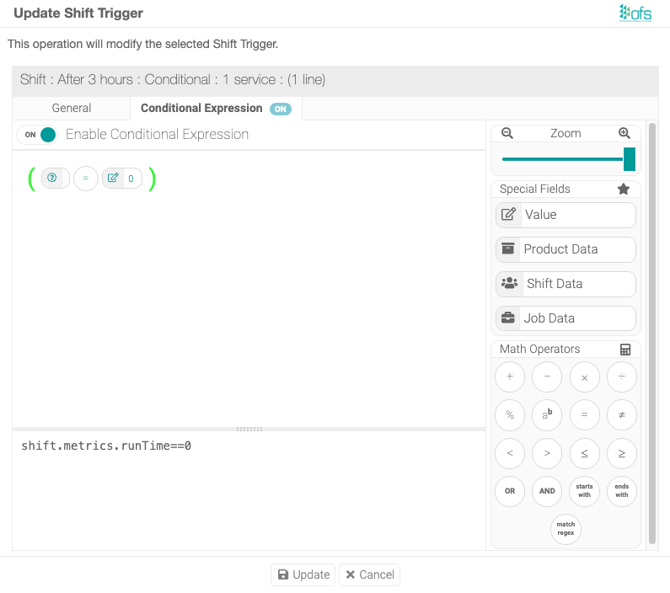
Step 13 — Click Update, then Save
Update stages the trigger; Save on the page commits it.