![OFS_Circle.png]](https://support.ofsystems.com/hs-fs/hubfs/OFS_Circle.png?height=45&name=OFS_Circle.png)
No — it isn't currently possible to trigger a form based on a percentage of a production run using a standard offset. Triggers in OFS-Flow work on absolute values: specific time durations, total unit counts, or machine state changes.
Because every production run varies in size, a fixed unit offset can't dynamically calculate the halfway point for every job.
Workarounds
- Manual trigger — operators can manually raise the form from the console once they judge the run to be roughly halfway complete.
- Rated speed unit trigger — if your jobs have consistent hourly requirements, set a trigger based on the product's rated speed. For example, a job that's typically 1,000 units can use an offset and repeat of 500 units to capture a mid-point check.
Setting up a rated speed unit trigger
Step 1 — Open the job trigger
-
In the Triggers tab, click the job trigger and click the + button.
Step 2 — Turn on the conditional expression
-
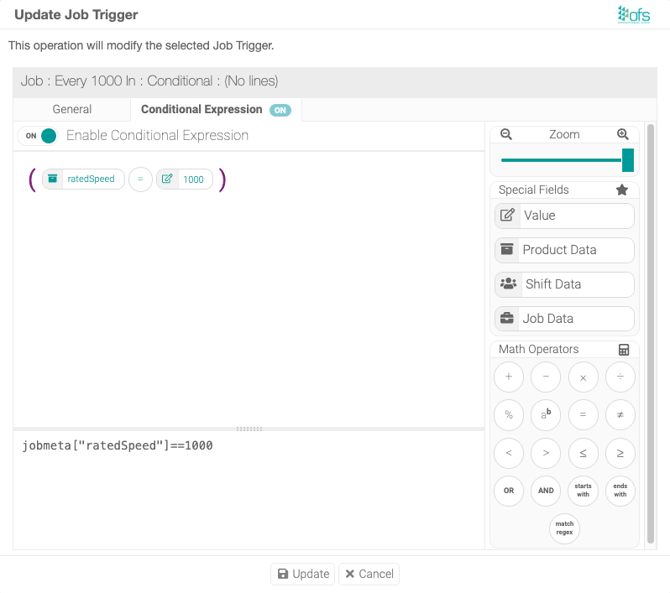
Click the Conditional Expression tab and toggle it on.
Step 3 — Enter the expression
-
Use an expression along these lines:
jobmeta["ratedSpeed"]==1000
Step 4 — Turn on Repeat
-
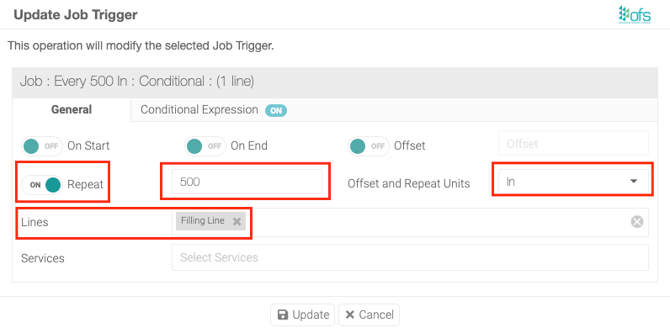
In the General tab, toggle on Repeat.
Step 5 — Set the unit count
-
Enter the number of units, e.g.
500.
Step 6 — Select the unit type
-
Select the Units, e.g.
In.
Step 7 — Select the lines
-
Select which lines this trigger applies to.
Step 8 — Save
-
Click Update, then Save.