---
title: How to create a count-based trigger using the conditional expression for the rated speed
description: You can create triggers based on unit counts instead of time. In this example, we're using the product's rated speed to simulate an hourly trigger. It checks if the ratedSpeed value stored in job metadata is exactly equal to 1000.
---
[Skip to content](https://support.ofsystems.com/how-to-create-a-count-based-trigger#main-content)
![OFS\_Circle.png\]](https://support.ofsystems.com/hs-fs/hubfs/OFS_Circle.png?height=45&name=OFS_Circle.png)
- [OFS Customer Portal](https://support.ofsystems.com/)
- [Main Website](https://ofsystems.com/)
- [Contact Us](https://www.ofsystems.com/contact-us?)
- [Service Portal](https://ofsystems.atlassian.net/servicedesk/customer/portal/1)
Open main navigation
Close main navigation
- [OFS Customer Portal](https://support.ofsystems.com/)
- [Main Website](https://ofsystems.com/)
- [Contact Us](https://www.ofsystems.com/contact-us?)
- [Service Portal](https://ofsystems.atlassian.net/servicedesk/customer/portal/1)
Welcome to the OFS Customer Portal
- There are no suggestions because the search field is empty.
1. [OFS Customer Portal](https://support.ofsystems.com/?hsLang=en)
2. [How To Questions](https://support.ofsystems.com/how-to-questions?hsLang=en)
3. [Flow - Conditional Expression & Triggers](https://support.ofsystems.com/how-to-questions?hsLang=en#flow-conditional-expression-triggers)
# How to create a count-based trigger using the conditional expression for the rated speed
## Build a trigger that fires on unit counts instead of time, using the product's rated speed so the check lands at roughly the same interval whatever the line is running.
#### **What you'll build**
- A Job trigger that repeats every so many units, rather than every so many minutes.
- A condition on the product's rated speed, so the count interval matches the product on the line.
#### **Step 1 — Work out the count you want**
A count-based trigger fires on units produced. To turn that into an hourly check, use the product's rated speed: a product rated at 1000 units an hour needs a trigger every 1000 units.
Products running at different speeds need different counts, which is what the conditional expression sorts out. One product per trigger, all on the same alert.
#### **Step 2 — Add a Job trigger**
In the **Triggers** tab, select **Job** and click the **+** button.
#### **Step 3 — Set the repeat and units**
In the **General** tab, toggle on **Repeat**, enter the number of units — `1000` in this example — and select the **Units**, for example **In**.
#### **Step 4 — Select the lines**
Choose the **Lines** the trigger applies to, and the **Services** that should deliver the message if the alert needs to notify someone.

#### **Step 5 — Add the conditional expression**
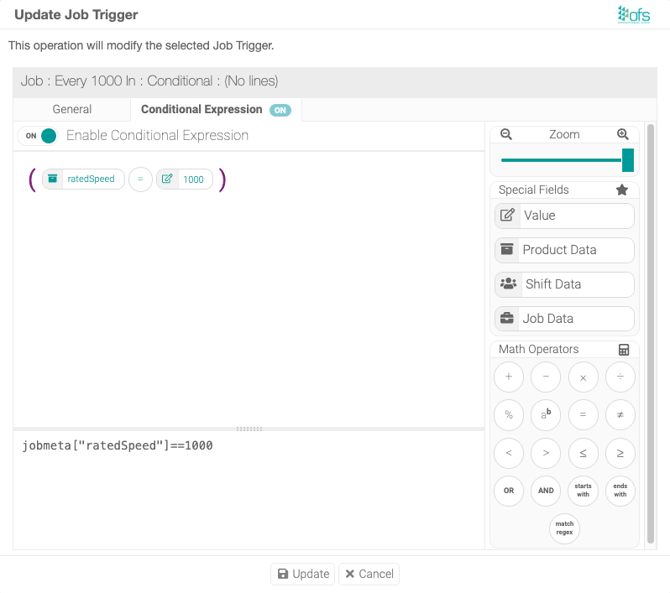
Click the **Conditional Expression** tab, toggle it **On**, and enter:
```
jobmeta["ratedSpeed"]==1000
```
This checks the `ratedSpeed` value stored against the product in your Product List. Replace `1000` with the actual rated speed for the product this trigger is for.
#### **Step 6 — Save**
Click **Update**, then **Save** on the page. The dialog's own button stages the change; the page-level **Save** commits it.
#### **Test it**
Run a job on a product with the rated speed you used in the condition and let it produce past the unit count. The alert should fire, then repeat at each multiple of the count.
If it fires on the wrong products, check the rated speed recorded against those products in the Product List rather than the trigger. If it fires on no products at all, check that the expression is not sitting empty — an enabled conditional expression with nothing in it is never true.
#### **Adapting it to your own products**
- Add a second trigger to the same alert for each rated speed you run. Trigger 1 might be `jobmeta["ratedSpeed"]==1000` repeating every 1000 In, trigger 2 `jobmeta["ratedSpeed"]==500` repeating every 500 In. One alert, one form, correct timing on every product.
- For a half-hourly check rather than hourly, halve both the repeat count and the value in the condition.
- If a product's `ratedSpeed` is blank in the Product List, no trigger matches it and the check never happens on that product, with no error and nothing to indicate a gap. Adding a SKU to a product list is not enough on its own — the metadata the condition reads has to be filled in too.
A full list of variables is available in the [Alert Variables](https://support.ofsystems.com/alert-variables?hsLang=en) article.
- [Getting Started](https://support.ofsystems.com/getting-started?hsLang=en#main-content)
- [Console: The Basics](https://support.ofsystems.com/getting-started?hsLang=en#console-the-basics)
- [Analytics: The Basics](https://support.ofsystems.com/getting-started?hsLang=en#analytics-the-basics)
- [Fusion Manager: The Basics](https://support.ofsystems.com/getting-started?hsLang=en#fusion-manager-the-basics)
- [OFS-Flow Training : The Basics](https://support.ofsystems.com/getting-started?hsLang=en#ofs-flow-training-the-basics)
- [OFS-Go](https://support.ofsystems.com/getting-started?hsLang=en#ofs-go)
- [MayvnAI](https://support.ofsystems.com/getting-started?hsLang=en#mayvnai)
- [Help & Support](https://support.ofsystems.com/help-support?hsLang=en#main-content)
- [Troubleshooting](https://support.ofsystems.com/help-support?hsLang=en#troubleshooting)
- [OFS in a Box](https://support.ofsystems.com/help-support?hsLang=en#ofs-in-a-box)
- [Routers](https://support.ofsystems.com/help-support?hsLang=en#routers)
- [PLCs](https://support.ofsystems.com/help-support?hsLang=en#plcs)
- [Success with MayvnAI](https://support.ofsystems.com/success-with-mayvnai?hsLang=en)
- [Training Videos](https://support.ofsystems.com/training-videos?hsLang=en#main-content)
- [Operator Console](https://support.ofsystems.com/training-videos?hsLang=en#operator-console)
- [OFS Analytics](https://support.ofsystems.com/training-videos?hsLang=en#ofs-analytics)
- [Fusion-Manager](https://support.ofsystems.com/training-videos?hsLang=en#fusion-manager)
- [OFS-Flow](https://support.ofsystems.com/training-videos?hsLang=en#ofs-flow)
- [OFS-Go](https://support.ofsystems.com/training-videos?hsLang=en#ofs-go)
- [How To Questions](https://support.ofsystems.com/how-to-questions?hsLang=en#main-content)
- [Administration](https://support.ofsystems.com/how-to-questions?hsLang=en#administration)
- [Operator Console](https://support.ofsystems.com/how-to-questions?hsLang=en#operator-console)
- [Analytics](https://support.ofsystems.com/how-to-questions?hsLang=en#analytics)
- [Fusion Manager](https://support.ofsystems.com/how-to-questions?hsLang=en#fusion-manager)
- [Fusion Manager - Alerts & Services](https://support.ofsystems.com/how-to-questions?hsLang=en#fusion-manager-alerts-services)
- [Flow](https://support.ofsystems.com/how-to-questions?hsLang=en#flow)
- [Flow - Validations](https://support.ofsystems.com/how-to-questions?hsLang=en#flow-validations)
- [Flow - Conditional Expression & Triggers](https://support.ofsystems.com/how-to-questions?hsLang=en#flow-conditional-expression-triggers)
- [APIs](https://support.ofsystems.com/how-to-questions?hsLang=en#apis)
- [FAQs](https://support.ofsystems.com/faqs?hsLang=en#main-content)
- [Operator Console](https://support.ofsystems.com/faqs?hsLang=en#operator-console)
- [Fusion Manager](https://support.ofsystems.com/faqs?hsLang=en#fusion-manager)
- [Analytics](https://support.ofsystems.com/faqs?hsLang=en#analytics)
- [OFS-Flow](https://support.ofsystems.com/faqs?hsLang=en#ofs-flow)
- [Case Studies](https://support.ofsystems.com/case-studies?hsLang=en#main-content)
- [Mavyn AI](https://support.ofsystems.com/case-studies?hsLang=en#mavyn-ai)
- [OFS Guides](https://support.ofsystems.com/ofs-guides?hsLang=en)
- [Webinars](https://support.ofsystems.com/webinars?hsLang=en)
[](http://ofsystems.com)
Operations Feedback Pty Ltd
7/627 Chapel St, South Yarra, VIC 3123
+61 3 8684 9859
[mailto:support@ofsystems.com](mailto:support@ofsystems.com)
Copyright © 2025, Operations Feedback Systems Pty Ltd.