---
title: How to configure Products in OFS?
description: A Step-by-Step Guide to Setting Up Product Lists and Metadata in OFS
---
[Skip to content](https://support.ofsystems.com/how-to-configure-products-in-ofs#main-content)
![OFS\_Circle.png\]](https://support.ofsystems.com/hs-fs/hubfs/OFS_Circle.png?height=45&name=OFS_Circle.png)
- [OFS Customer Portal](https://support.ofsystems.com/)
- [Main Website](https://ofsystems.com/)
- [Contact Us](https://www.ofsystems.com/contact-us?)
- [Service Portal](https://ofsystems.atlassian.net/servicedesk/customer/portal/1)
Open main navigation
Close main navigation
- [OFS Customer Portal](https://support.ofsystems.com/)
- [Main Website](https://ofsystems.com/)
- [Contact Us](https://www.ofsystems.com/contact-us?)
- [Service Portal](https://ofsystems.atlassian.net/servicedesk/customer/portal/1)
Welcome to the OFS Customer Portal
- There are no suggestions because the search field is empty.
1. [OFS Customer Portal](https://support.ofsystems.com/?hsLang=en)
2. [How To Questions](https://support.ofsystems.com/how-to-questions?hsLang=en)
3. [Fusion Manager](https://support.ofsystems.com/how-to-questions?hsLang=en#fusion-manager)
# How to configure Products in OFS?
## This covers setting up product lists and metadata in Fusion Manager, either one product at a time or in bulk using Import & Export.
#### **Adding a product manually**
#### **Step 1 — Open the product list**
Navigate to **Fusion Manager \> Products**, then open the product list you want to add to.
#### **Step 2 — Add the product**
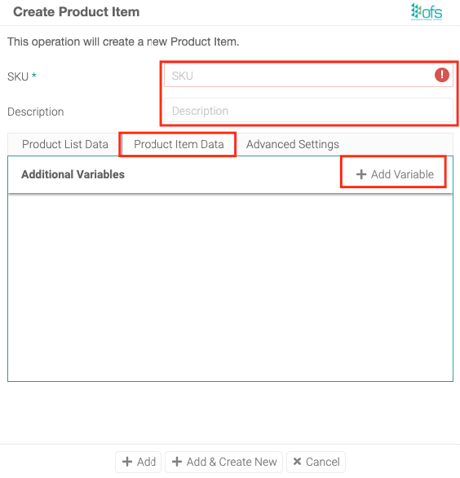
Click **+ Add Product** and enter:
- **SKU** — a unique product code.
- **Description** — the product name.
#### **Step 3 — Set the product's list data**
On the **Product List Data** tab, set values for the list's variables — most importantly **Rated Speed**, which is required. If a product has no rated speed set, OFS falls back to the line's plated speed, which distorts Performance in your OEE figures. A rated speed of `0` or `1` is worse than leaving it blank — it isn't caught by the "Missing Rated Speed" warning, and can cause problems with state recording and transitioning on the console.
#### **Step 4 — Add any extra metadata**
Use the **Product Item Data** tab to add ad-hoc metadata for this specific product — for example weight or packaging type.
---
#### **Adding products using Import & Export**
#### **Step 5 — Export the current list**
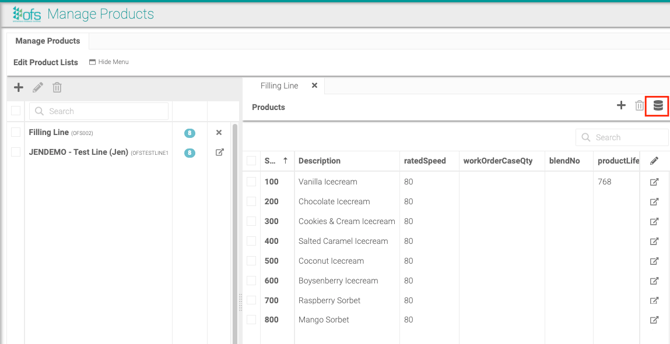
Click the **Import & Export** icon, then **Export**.
#### **Step 6 — Add your new products to the file**
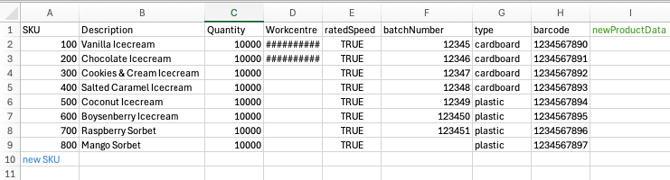
Open the CSV file and add a new row for each product, filling in:
- **SKU**
- **Description**
- **ratedSpeed**
- 
#### **Step 7 — Import the file**
Navigate to **Fusion Manager \> Import & Export**, click **Choose File**, then **Import**. Check the rows in the grid before saving — only the products you meant to change should appear highlighted — then click **Save** on the page to commit the import.
#### **Using metadata effectively**
Metadata improves product tracking and reporting. Common examples:
- **Weight** — product weight.
- **Packaging Type** — bottle, can, and so on.
- **Production Line** — the assigned line.
Variable names can't contain spaces — a name with a space in it can never be made available for operators to edit on the console. camelCase is the recommended naming style (for example `packagingType`), though PascalCase also works and doesn't need to be migrated if that's already your convention.
#### **Test it**
Save your configuration, then run a test job to confirm the product tracks correctly and its metadata logs as expected. While you're there, check the list for any "Missing Rated Speed" warnings, and double-check that no rated speed has been left at `0` or `1`.
- [Getting Started](https://support.ofsystems.com/getting-started?hsLang=en#main-content)
- [Console: The Basics](https://support.ofsystems.com/getting-started?hsLang=en#console-the-basics)
- [Analytics: The Basics](https://support.ofsystems.com/getting-started?hsLang=en#analytics-the-basics)
- [Fusion Manager: The Basics](https://support.ofsystems.com/getting-started?hsLang=en#fusion-manager-the-basics)
- [OFS-Flow Training : The Basics](https://support.ofsystems.com/getting-started?hsLang=en#ofs-flow-training-the-basics)
- [OFS-Go](https://support.ofsystems.com/getting-started?hsLang=en#ofs-go)
- [MayvnAI](https://support.ofsystems.com/getting-started?hsLang=en#mayvnai)
- [Help & Support](https://support.ofsystems.com/help-support?hsLang=en#main-content)
- [Troubleshooting](https://support.ofsystems.com/help-support?hsLang=en#troubleshooting)
- [OFS in a Box](https://support.ofsystems.com/help-support?hsLang=en#ofs-in-a-box)
- [Routers](https://support.ofsystems.com/help-support?hsLang=en#routers)
- [PLCs](https://support.ofsystems.com/help-support?hsLang=en#plcs)
- [Success with MayvnAI](https://support.ofsystems.com/success-with-mayvnai?hsLang=en)
- [Training Videos](https://support.ofsystems.com/training-videos?hsLang=en#main-content)
- [Operator Console](https://support.ofsystems.com/training-videos?hsLang=en#operator-console)
- [OFS Analytics](https://support.ofsystems.com/training-videos?hsLang=en#ofs-analytics)
- [Fusion-Manager](https://support.ofsystems.com/training-videos?hsLang=en#fusion-manager)
- [OFS-Flow](https://support.ofsystems.com/training-videos?hsLang=en#ofs-flow)
- [OFS-Go](https://support.ofsystems.com/training-videos?hsLang=en#ofs-go)
- [How To Questions](https://support.ofsystems.com/how-to-questions?hsLang=en#main-content)
- [Administration](https://support.ofsystems.com/how-to-questions?hsLang=en#administration)
- [Operator Console](https://support.ofsystems.com/how-to-questions?hsLang=en#operator-console)
- [Analytics](https://support.ofsystems.com/how-to-questions?hsLang=en#analytics)
- [Fusion Manager](https://support.ofsystems.com/how-to-questions?hsLang=en#fusion-manager)
- [Fusion Manager - Alerts & Services](https://support.ofsystems.com/how-to-questions?hsLang=en#fusion-manager-alerts-services)
- [Flow](https://support.ofsystems.com/how-to-questions?hsLang=en#flow)
- [Flow - Validations](https://support.ofsystems.com/how-to-questions?hsLang=en#flow-validations)
- [Flow - Conditional Expression & Triggers](https://support.ofsystems.com/how-to-questions?hsLang=en#flow-conditional-expression-triggers)
- [APIs](https://support.ofsystems.com/how-to-questions?hsLang=en#apis)
- [FAQs](https://support.ofsystems.com/faqs?hsLang=en#main-content)
- [Operator Console](https://support.ofsystems.com/faqs?hsLang=en#operator-console)
- [Fusion Manager](https://support.ofsystems.com/faqs?hsLang=en#fusion-manager)
- [Analytics](https://support.ofsystems.com/faqs?hsLang=en#analytics)
- [OFS-Flow](https://support.ofsystems.com/faqs?hsLang=en#ofs-flow)
- [Case Studies](https://support.ofsystems.com/case-studies?hsLang=en#main-content)
- [Mavyn AI](https://support.ofsystems.com/case-studies?hsLang=en#mavyn-ai)
- [OFS Guides](https://support.ofsystems.com/ofs-guides?hsLang=en)
- [Webinars](https://support.ofsystems.com/webinars?hsLang=en)
[](http://ofsystems.com)
Operations Feedback Pty Ltd
7/627 Chapel St, South Yarra, VIC 3123
+61 3 8684 9859
[mailto:support@ofsystems.com](mailto:support@ofsystems.com)
Copyright © 2025, Operations Feedback Systems Pty Ltd.