---
title: How to calculate the range (max − min) across multiple fields in a form
description: If you've got a set of integer or number fields in a form and you want to automatically work out the difference between the highest and lowest values, you can do it with three Calculation fields. This is useful for things like checking variation across multiple weight checks, temperature readings, or sample measurements on a line.
---
[Skip to content](https://support.ofsystems.com/how-to-calculate-the-range-max-min-across-multiple-fields-in-a-form#main-content)
![OFS\_Circle.png\]](https://support.ofsystems.com/hs-fs/hubfs/OFS_Circle.png?height=45&name=OFS_Circle.png)
- [OFS Customer Portal](https://support.ofsystems.com/)
- [Main Website](https://ofsystems.com/)
- [Contact Us](https://www.ofsystems.com/contact-us?)
- [Service Portal](https://ofsystems.atlassian.net/servicedesk/customer/portal/1)
Open main navigation
Close main navigation
- [OFS Customer Portal](https://support.ofsystems.com/)
- [Main Website](https://ofsystems.com/)
- [Contact Us](https://www.ofsystems.com/contact-us?)
- [Service Portal](https://ofsystems.atlassian.net/servicedesk/customer/portal/1)
Welcome to the OFS Customer Portal
- There are no suggestions because the search field is empty.
1. [OFS Customer Portal](https://support.ofsystems.com/?hsLang=en)
2. [How To Questions](https://support.ofsystems.com/how-to-questions?hsLang=en)
3. [Flow](https://support.ofsystems.com/how-to-questions?hsLang=en#flow)
# How to calculate the range (max − min) across multiple fields in a form
## If you've got a set of integer or number fields in a form and want to automatically work out the difference between the highest and lowest values, you can do it with three Calculation fields — useful for checking variation across weight checks, temperature readings, or sample measurements on a line.
#### **What you'll build**
Five integer fields (your input values), plus three calculation fields:
- **max\_calc** (label: Max) — finds the highest value
- **min\_calc** (label: Min) — finds the lowest value
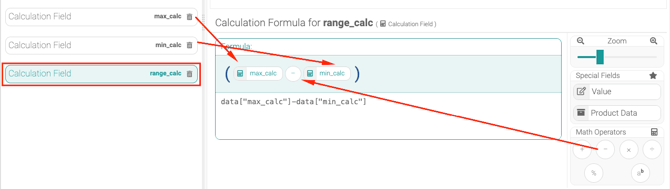
- **range\_calc** (label: Range) — subtracts Min from Max
You can hide Max and Min once it's working, if you only want operators to see the Range.
#### **Step 1 — Add your input fields**
Add five integer fields with unique names. This example uses `value_1` through `value_5`.
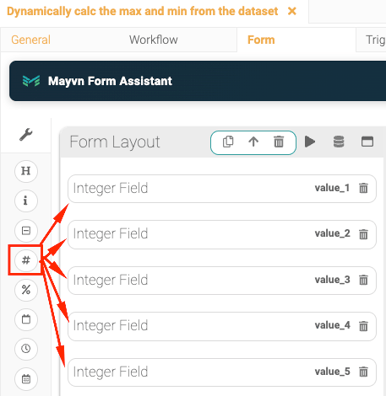
Keep the field names consistent — the calculations below reference them exactly.
#### **Step 2 — Add the Max calculation field**
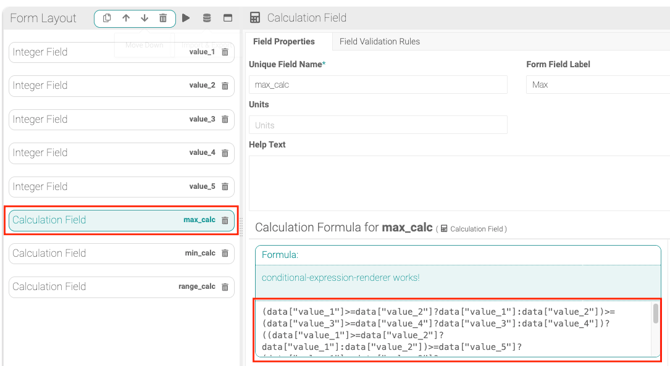
Add a calculation field with Unique Field Name `max_calc` (Form Field Label: **Max**) and paste this into the formula:
```
(data["value_1"]>=data["value_2"]?data["value_1"]:data["value_2"])>=(data["value_3"]>=data["value_4"]?data["value_3"]:data["value_4"])?((data["value_1"]>=data["value_2"]?data["value_1"]:data["value_2"])>=data["value_5"]?(data["value_1"]>=data["value_2"]?data["value_1"]:data["value_2"]):data["value_5"]):((data["value_3"]>=data["value_4"]?data["value_3"]:data["value_4"])>=data["value_5"]?(data["value_3"]>=data["value_4"]?data["value_3"]:data["value_4"]):data["value_5"])
```
### 
#### **Step 3 — Add the Min calculation field**
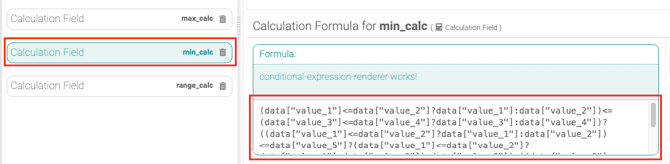
Add a calculation field with Unique Field Name `min_calc` (Form Field Label: **Min**) and paste this in:
```
(data["value_1"]<=data["value_2"]?data["value_1"]:data["value_2"])<=(data["value_3"]<=data["value_4"]?data["value_3"]:data["value_4"])?((data["value_1"]<=data["value_2"]?data["value_1"]:data["value_2"])<=data["value_5"]?(data["value_1"]<=data["value_2"]?data["value_1"]:data["value_2"]):data["value_5"]):((data["value_3"]<=data["value_4"]?data["value_3"]:data["value_4"])<=data["value_5"]?(data["value_3"]<=data["value_4"]?data["value_3"]:data["value_4"]):data["value_5"])
```
### 
#### **Step 4 — Add the Range calculation field**
Add a calculation field with Unique Field Name `range_calc` (Form Field Label: **Range**) with this simple formula:
```
data["max_calc"]-data["min_calc"]
```
### 
#### **Test it**
Enter these values into Value 1–5: **10, 25, 15, 30, 20**.
You should see:
- Max = 30
- Min = 10
- Range = 20
#### **Adapting it to your own form**
If your fields are named differently, replace `value_1` through `value_5` in the Max and Min formulas with your actual field names. Field names are case-sensitive and must match exactly, including any spaces.
- [Getting Started](https://support.ofsystems.com/getting-started?hsLang=en#main-content)
- [Console: The Basics](https://support.ofsystems.com/getting-started?hsLang=en#console-the-basics)
- [Analytics: The Basics](https://support.ofsystems.com/getting-started?hsLang=en#analytics-the-basics)
- [Fusion Manager: The Basics](https://support.ofsystems.com/getting-started?hsLang=en#fusion-manager-the-basics)
- [OFS-Flow Training : The Basics](https://support.ofsystems.com/getting-started?hsLang=en#ofs-flow-training-the-basics)
- [OFS-Go](https://support.ofsystems.com/getting-started?hsLang=en#ofs-go)
- [MayvnAI](https://support.ofsystems.com/getting-started?hsLang=en#mayvnai)
- [Help & Support](https://support.ofsystems.com/help-support?hsLang=en#main-content)
- [Troubleshooting](https://support.ofsystems.com/help-support?hsLang=en#troubleshooting)
- [OFS in a Box](https://support.ofsystems.com/help-support?hsLang=en#ofs-in-a-box)
- [Routers](https://support.ofsystems.com/help-support?hsLang=en#routers)
- [PLCs](https://support.ofsystems.com/help-support?hsLang=en#plcs)
- [Success with MayvnAI](https://support.ofsystems.com/success-with-mayvnai?hsLang=en)
- [Training Videos](https://support.ofsystems.com/training-videos?hsLang=en#main-content)
- [Operator Console](https://support.ofsystems.com/training-videos?hsLang=en#operator-console)
- [OFS Analytics](https://support.ofsystems.com/training-videos?hsLang=en#ofs-analytics)
- [Fusion-Manager](https://support.ofsystems.com/training-videos?hsLang=en#fusion-manager)
- [OFS-Flow](https://support.ofsystems.com/training-videos?hsLang=en#ofs-flow)
- [OFS-Go](https://support.ofsystems.com/training-videos?hsLang=en#ofs-go)
- [How To Questions](https://support.ofsystems.com/how-to-questions?hsLang=en#main-content)
- [Administration](https://support.ofsystems.com/how-to-questions?hsLang=en#administration)
- [Operator Console](https://support.ofsystems.com/how-to-questions?hsLang=en#operator-console)
- [Analytics](https://support.ofsystems.com/how-to-questions?hsLang=en#analytics)
- [Fusion Manager](https://support.ofsystems.com/how-to-questions?hsLang=en#fusion-manager)
- [Fusion Manager - Alerts & Services](https://support.ofsystems.com/how-to-questions?hsLang=en#fusion-manager-alerts-services)
- [Flow](https://support.ofsystems.com/how-to-questions?hsLang=en#flow)
- [Flow - Validations](https://support.ofsystems.com/how-to-questions?hsLang=en#flow-validations)
- [Flow - Conditional Expression & Triggers](https://support.ofsystems.com/how-to-questions?hsLang=en#flow-conditional-expression-triggers)
- [APIs](https://support.ofsystems.com/how-to-questions?hsLang=en#apis)
- [FAQs](https://support.ofsystems.com/faqs?hsLang=en#main-content)
- [Operator Console](https://support.ofsystems.com/faqs?hsLang=en#operator-console)
- [Fusion Manager](https://support.ofsystems.com/faqs?hsLang=en#fusion-manager)
- [Analytics](https://support.ofsystems.com/faqs?hsLang=en#analytics)
- [OFS-Flow](https://support.ofsystems.com/faqs?hsLang=en#ofs-flow)
- [Case Studies](https://support.ofsystems.com/case-studies?hsLang=en#main-content)
- [Mavyn AI](https://support.ofsystems.com/case-studies?hsLang=en#mavyn-ai)
- [OFS Guides](https://support.ofsystems.com/ofs-guides?hsLang=en)
- [Webinars](https://support.ofsystems.com/webinars?hsLang=en)
[](http://ofsystems.com)
Operations Feedback Pty Ltd
7/627 Chapel St, South Yarra, VIC 3123
+61 3 8684 9859
[mailto:support@ofsystems.com](mailto:support@ofsystems.com)
Copyright © 2025, Operations Feedback Systems Pty Ltd.